Anasayfa
Hakkımda
Hizmetler
WordPress
Web Yazılım Geliştirme
Proje Tasarım ve Analizi
E-Ticaret
Dijital Pazarlama
Markalaşma
Projeler
Blog
İletişim
İletişim
İletişim
View Categories
Başlangıç
Dokümanlar
Wonder Wall
Wonder Wall Navigation Menu
Wonder Wall Navigation Menu
< 1 min read
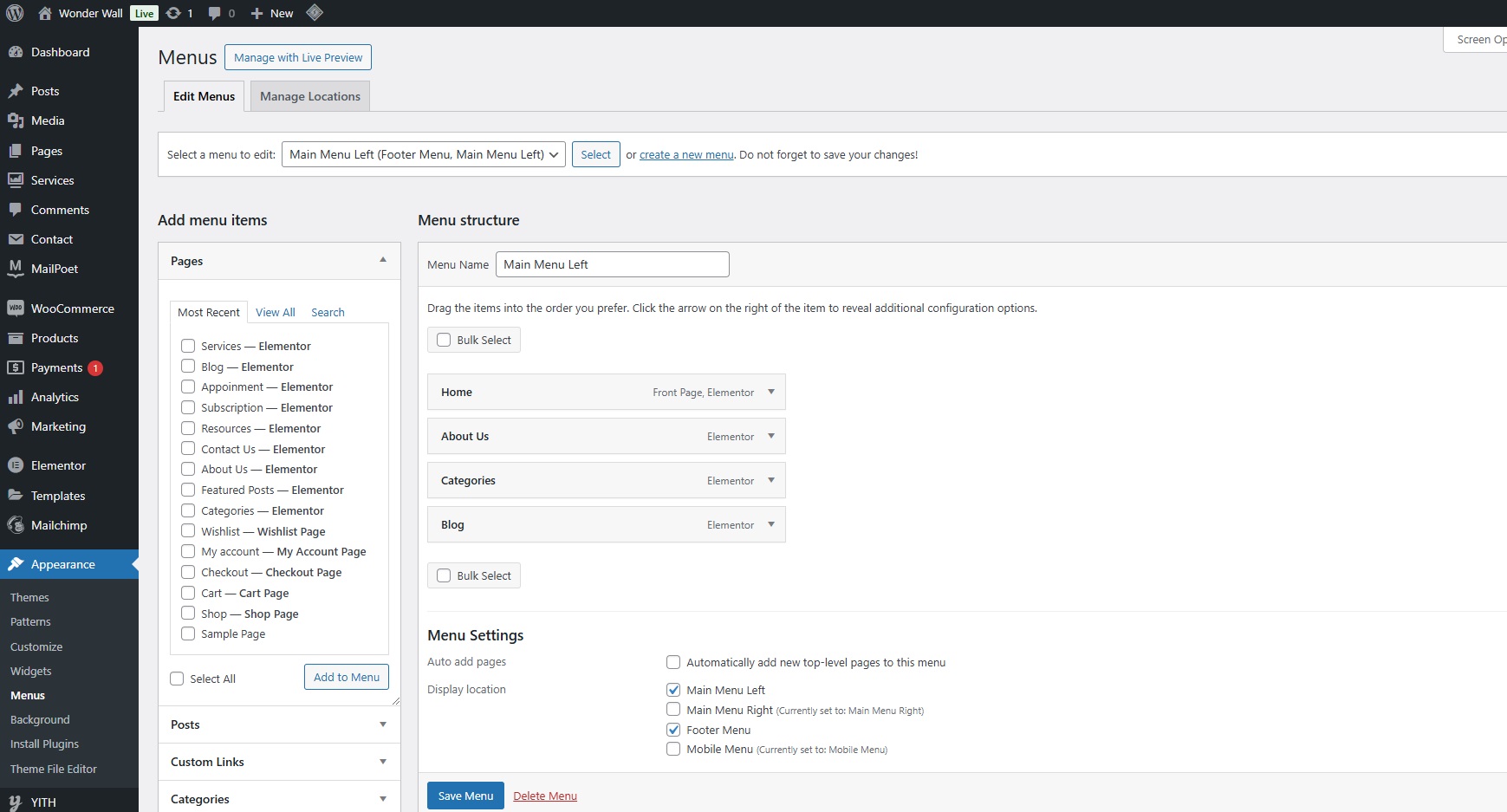
Go to your WordPress dashboard.
Navigate to
Appearance
>
Menus
.
On the left-hand side, you’ll see options to add
Pages
,
Posts
,
Custom Links
, or
Categories
to your menu.
Check the box next to the items you want to add and click
Add to Menu
.
Drag and drop the menu items in the order you want them to appear.
To create submenus, drag an item slightly to the right under a parent item.
Click the
Save Menu
button to apply your changes.
Wonder Wall Social Media Settings
Wonder Wall Header Settings
Leave a Reply
Cancel reply
Save my name, email, and website in this browser for the next time I comment.
Post Comment
Post Comment



Leave a Reply